
Additional Setup Information
Configuration Initialization
prismAId offers multiple ways to create review configuration files:
-
Web Initializer: Use the browser-based tool on the Review Configurator page to create TOML configuration files through a user-friendly interface.
-
Template Files: Ready-to-use configuration templates are available in the projects/templates directory for review, screening, and Zotero download tools.
-
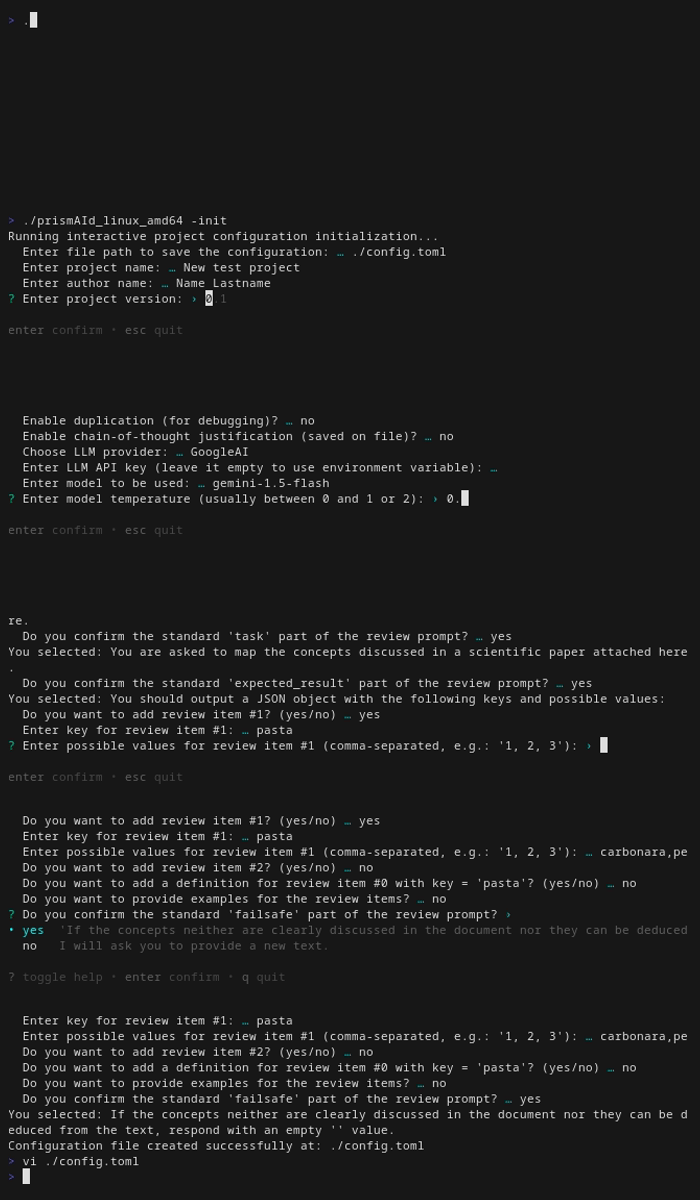
Command Line Initializer: Use the binary with the -init flag to create a configuration file through an interactive terminal:
./prismaid -init
Apache Tika Server for OCR (Optional)
For automatic OCR fallback when standard document conversion fails or returns empty text, you can set up an Apache Tika server. Tika is used automatically when conversion methods fail - you don’t call it separately.
What is Apache Tika?
Apache Tika is a content analysis toolkit that can extract text and metadata from over a thousand different file types. When configured with Tesseract OCR, it automatically serves as a fallback for:
- Scanned PDF documents (when standard PDF extraction returns empty)
- Image files (PNG, JPEG, TIFF, etc.)
- Documents where standard extraction methods fail or return no text
- Corrupted or non-standard files
Important: Tika is never called directly - it’s only used as an automatic fallback when standard conversion methods (like ledongthuc/pdf or pdfcpu for PDFs) fail or return empty text.
Quick Start with Included Script
prismAId includes a helper script (tika-service.sh) to easily manage a local Tika server using Podman or Docker:
# Start Tika server with OCR support
./tika-service.sh start

# Check if the server is running
./tika-service.sh status

# View server logs
./tika-service.sh logs

# Stop the server
./tika-service.sh stop
The server will be available at http://localhost:9998 by default.
Manual Setup with Docker/Podman
If you prefer to manage the container manually:
Using Docker:
# Pull and run Tika server with full OCR support
docker run -d -p 9998:9998 --name tika-ocr apache/tika:latest-full

# Check if it's running
docker ps | grep tika-ocr

# View logs
docker logs tika-ocr

# Stop the server
docker stop tika-ocr
docker rm tika-ocr
Using Podman:
# Pull and run Tika server with full OCR support
podman run -d -p 9998:9998 --name tika-ocr apache/tika:latest-full

# Check if it's running
podman ps | grep tika-ocr

# View logs
podman logs tika-ocr

# Stop the server
podman stop tika-ocr
podman rm tika-ocr
Testing Your Tika Server
Verify that the server is running correctly:
# Test with curl
curl http://localhost:9998/tika

# Or test with a file
curl -T sample.pdf http://localhost:9998/tika --header "Accept: text/plain"
If working correctly, you should receive a response from the server.
Using Tika with prismAId
Once the Tika server is running, provide its address when converting. Tika will automatically be used as fallback when standard methods fail:
# Convert PDFs - Tika used automatically as fallback when needed
./prismaid -convert-pdf ./papers -tika-server localhost:9998
The conversion will:
- Try standard methods first (fast, local)
- Only if they fail or return empty text → use Tika as fallback
See the Convert Tool documentation for more details.
System Requirements
- RAM: 2-4 GB for the Tika container
- Disk Space: ~1 GB for the Docker/Podman image
- Software: Docker or Podman installed on your system
Troubleshooting
Server won’t start:
- Ensure port 9998 is not already in use:
lsof -i :9998ornetstat -an | grep 9998 - Check Docker/Podman is running:
docker infoorpodman info
Server is slow:
- OCR processing is CPU-intensive and can take 10-60 seconds per page
- Ensure adequate RAM is available (at least 4 GB free)
- Consider processing documents in smaller batches
Connection refused:
- Wait a few seconds after starting - the server needs time to initialize
- Check firewall settings if accessing from another machine
Use in Jupyter Notebooks
In versions <= 0.6.6, the prompt asking the user to confirm the review cannot be disabled. This crashes the Python engine in Jupyter notebooks and makes it impossible to run single-model reviews (in ensemble reviews, confirmation requests are disabled automatically).
To overcome this problem, it is possible to intercept the IO on the terminal as it follows:
import pty
import os
import time
import select

def run_review_with_auto_input(input_str):
    master, slave = pty.openpty()  # Create a pseudo-terminal

    pid = os.fork()
    if pid == 0:  # Child process
        os.dup2(slave, 0)  # Redirect stdin
        os.dup2(slave, 1)  # Redirect stdout
        os.dup2(slave, 2)  # Redirect stderr
        os.close(master)
        import prismaid
        prismaid.review(input_str)
        os._exit(0)

    else:  # Parent process
        os.close(slave)
        try:
            while True:
                rlist, _, _ = select.select([master], [], [], 5)
                if master in rlist:
                    output = os.read(master, 1024).decode("utf-8", errors="ignore")
                    if not output:
                        break  # Process finished

                    print(output, end="")

                    if "Do you want to continue?" in output:
                        print("\n[SENDING INPUT: y]")
                        os.write(master, b"y\n")
                        time.sleep(1)
        finally:
            os.close(master)
            os.waitpid(pid, 0)  # Ensure the child process is cleaned up

# Load your review (TOML) configuration
with open("config.toml", "r") as file:
    input_str = file.read()

# Run the review function
run_review_with_auto_input(input_str)